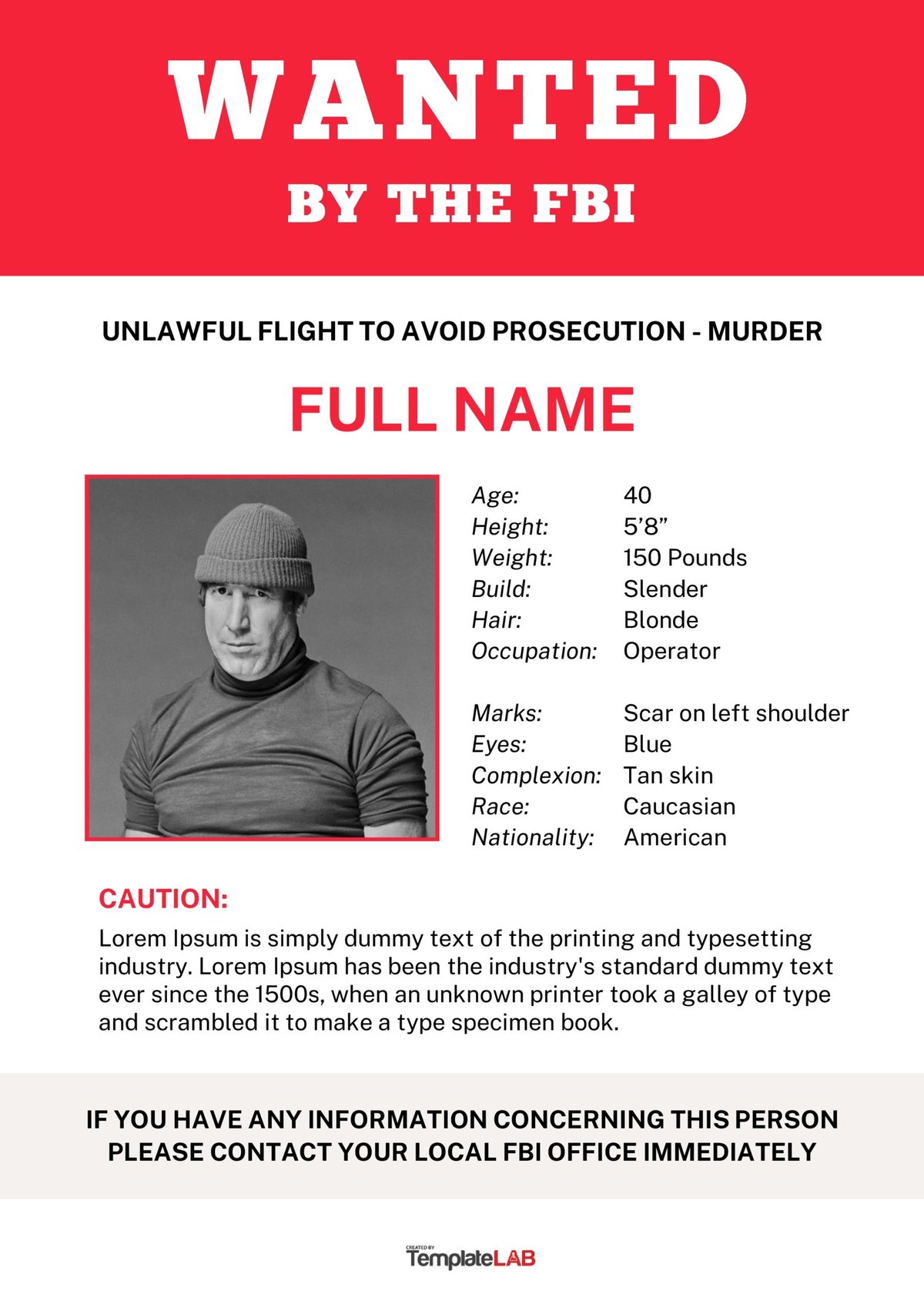
Creating a wanted poster isn't just about yelling "WANTED!" in a Wild West font. Whether you're playfully "hunting" a friend who owes you a coffee, announcing a missing pet, or seriously trying to attract job candidates, knowing how to create a wanted poster effectively means blending visual appeal with clear, compelling information. It's a powerful communication tool, steeped in history but perfectly at home in our digital age.
Ready to craft a poster that stops people in their tracks? Let's dive in.
At a Glance: Your Wanted Poster Roadmap
- Define Your Purpose: Is it for fun, a missing item, a job opening, or something else? This dictates your design and content.
- Gather Your Details: Get a clear image, specific descriptions, and all necessary contact information.
- Choose Your Tool: Free online makers like Adobe Express and Canva offer templates, customization, and user-friendly interfaces.
- Customize & Personalize: Upload photos, tweak text, choose fonts, and apply filters to match your desired aesthetic (think vintage or modern).
- Include Key Info: Always feature a headline, image, description, and a clear call to action (e.g., reward, contact details).
- Review Before Release: Check for typos, clarity, and ensure all information is accurate.
- Share Strategically: Download in appropriate formats (PDF for print, JPG/PNG for web) and distribute wisely.
Why Create a Wanted Poster? Beyond the Wild West Meme
The iconic "Wanted Dead or Alive" poster conjures images of dusty saloons and frontier justice, but its modern iterations serve a surprisingly broad range of purposes. Forget the bounty hunters for a moment; today, a well-crafted wanted poster can be incredibly versatile:
For Laughter & Lighthearted Shenanigans
- Friendly Pranks: "Wanted: For Stealing the Last Slice of Pizza" for a buddy.
- Roasts & Parties: A playful poster for a birthday or retirement, highlighting humorous "crimes" committed by the guest of honor.
- Pet Shenanigans: Catching your cat "red-handed" for knocking over the plant. These posters are all about inside jokes and creating smiles.
For Practical & Purposeful Calls to Action
- Missing & Lost: Quickly alert your community about a lost pet, a valuable item, or even a missing person (though for serious cases, always involve authorities first).
- Community Engagement: Mobilize volunteers for an event, announce a crowdfunding initiative, or warn neighbors about a local threat or disaster.
- Hiring & Recruitment: Think outside the box for job postings! A "Wanted: Dynamic Marketing Guru" poster can grab attention more effectively than a generic job ad. Specify the position, duties, salary range, and application process.
- Tenant/Roommate Search: Clearly outline the property, location, rent, and what you're looking for in a housemate.
- Event Promotion: A creative way to announce a themed party or gathering.
For Creative & Artistic Expression
- Storytelling: Visual aids for role-playing games, fiction writing, or theatrical props.
- Personal Branding: Artists or designers might create one to showcase their skills or capture their unique style.
Each of these uses requires a slightly different approach to content, tone, and design, but the core principles remain the same: grab attention and convey critical information.
The Essential Elements of a High-Impact Wanted Poster
Regardless of your purpose, certain elements make a wanted poster effective. Think of these as your non-negotiable building blocks:
- A Powerful Headline: "WANTED," "MISSING," "HIRING," "REWARD" – this is your immediate attention-grabber. Make it bold, prominent, and impossible to miss.
- Clear Visual Evidence (Image): A high-quality photo or sketch of the "wanted" individual, pet, or even a representation of the item. For people, a clear, head-on shot is usually best. For pets, a recognizable photo that shows distinguishing features.
- Compelling Description: This is where you fill in the blanks.
- For a person/pet: Name, distinguishing physical features (height, weight, hair/eye color, scars, breed, collar color), personality traits, and last known location.
- For a job: Position title, key duties, required skills, and cultural fit.
- For a tenant: Number of bedrooms, amenities, location benefits, and desired tenant qualities.
- For a missing item: Detailed description, brand, serial number (if applicable), and unique identifiers.
- The "Crime" / Purpose: Why are they wanted? What's the context? Is it for "grand theft auto of snacks" or a genuine "missing person" alert? For job postings, this is your compelling value proposition for candidates.
- Reward (If Applicable): Monetary, sentimental, or a simple "eternal gratitude." A reward can incentivize action.
- Crucial Contact Information: How can people respond? Phone number, email address, website, social media handle, or physical address. Make it easy to find and use.
- Issuer/Date: Who created the poster and when? This adds authenticity and helps with tracking.
- Style & Tone: This needs to align with your purpose. A playful poster might use cartoonish fonts, while a serious missing poster demands clear, legible typography.
Choosing Your Digital Canvas: Adobe Express vs. Canva
Gone are the days of hand-drawing crude posters (unless that's your specific aesthetic!). Today, powerful, user-friendly online tools make professional-looking wanted posters accessible to everyone. The two big players in this space are Adobe Express and Canva. Both offer fantastic free tiers and premium upgrades, but they have distinct strengths.
The Free & Easy Promise: Why Online Makers Rule
Both Adobe Express and Canva democratize design. They provide:
- Thousands of Templates: Start with a pre-designed layout to save time and ensure a professional look.
- Blank Canvas Option: For those who want full creative control.
- Photo/Logo Uploads: Personalize your poster with your own images.
- Extensive Libraries: Access millions of free stock images, graphics, backgrounds, and icons.
- Customization Galore: Adjust text, colors, filters, and typography with ease.
- Flexible Downloads: Get your design as a PDF (for printing), JPG, or PNG (for web).
Adobe Express: The Creative Professional's Friend (Even for Beginners)
Adobe Express is a powerful, web-based design tool that carries the prestige of the Adobe brand, known for its professional design software like Photoshop and Illustrator. It's built for speed and creativity, offering a robust set of features even for free users.
Key Strengths of Adobe Express:
- Adobe Ecosystem Integration: If you're already familiar with Adobe products, Express feels intuitive. It can even import PSD or Ai files, recognizing all layers, which is a huge bonus for designers.
- Rich Asset Library: Start projects with royalty-free content from the vast Adobe Stock collection, including photos, videos, and audio.
- AI Generation: A standout feature! "You type it. Adobe Express generates it" means you can quickly create unique elements or even entire images just from text prompts.
- Brand Kits (Premium): For consistent branding across multiple posters (e.g., a series of hiring ads), a premium plan allows auto-application of your brand logos, colors, and fonts.
- High-Quality Printing: For desktop users in the US, UK, Australia, and Canada, you can order professional, high-quality prints directly through the platform, delivered to your door.
- Typography & Filters: The editor offers specialized options for vintage or bold typography and a range of background image filters to achieve specific moods.
- No Specialized Training Needed: Despite its powerful features, the interface is incredibly user-friendly.
Adobe Express, with its implied connection to serious applications like fighting crime, leans towards robust features for those who appreciate design depth while still being accessible.
Canva: The Design Powerhouse for Everyone
Canva has become a household name for good reason. It’s incredibly intuitive and has made graphic design accessible to millions. It excels at guiding users through the design process.
Key Strengths of Canva:
- Clear Step-by-Step Instructions: Canva is renowned for its user-friendly interface that walks you through the creation process, making it ideal for beginners.
- Old-Fashioned Aesthetic Focus: Canva provides specific guidance and templates for creating "old-fashioned" wanted posters. This includes readily available vintage templates, Wild West fonts, sepia filters, blurring, burned-paper effects, and Old Western icons (like sheriff stars). If you're going for that classic look, Canva makes it effortless.
- Canva Print Service: Similar to Adobe Express, Canva offers its own high-quality print service, allowing you to order posters with chosen finishes and delivery.
- Canva Pro Benefits: Unlocks a broader array of design features, including more stock content, premium templates, and advanced editing tools.
- Design Guides: Helpful color palette and typography guides are available, perfect for design novices to ensure their posters look professional.
- Diverse Use Cases: Canva explicitly highlights its utility for attracting job candidates, finding tenants, making missing/lost-and-found announcements, and supporting community initiatives.
Making Your Choice: Adobe Express vs. Canva
| Feature/Capability | Adobe Express | Canva |
|---|---|---|
| Ease of Use | Highly intuitive, quick learning curve. | Extremely user-friendly, step-by-step guidance. |
| Template Library | Thousands of diverse templates. | Thousands, with a strong emphasis on varied purposes (hiring, missing). |
| Custom Assets | Upload own, Adobe Stock library, AI generation. | Upload own, vast stock library, good for specific icons. |
| Vintage/Old West | Capable with filters/fonts, but less direct focus in tutorials. | Strong emphasis and specific features (sepia, burned paper, Wild West fonts). |
| Professional Tools | PSD/AI import, Brand Kits (premium), Adobe Stock. | Color palettes, typography guides, Pro features. |
| Printing Service | High-quality print orders (US, UK, AUS, CAN). | High-quality print orders with various finishes. |
| Best For... | Designers who want advanced features in a simplified interface, AI tools, deep asset integration. | Beginners, those seeking specific "old-fashioned" aesthetics, varied practical uses. |
| Both platforms are excellent, and often, personal preference plays a huge role. If you want a quick way to create a wanted poster generator experience, either platform will serve you well. |
Step-by-Step: How to Create a Wanted Poster with Digital Tools
Let's walk through the process using the general capabilities common to both Adobe Express and Canva.
Step 1: Define Your "Criminal" (or Purpose)
Before you even open a design tool, get clear on why you're making this poster.
- For fun? What's the humorous "crime"? Who's the target?
- Missing item/pet? What exactly is missing? What are its unique identifiers?
- Hiring? What's the job title? What kind of person are you looking for?
Your purpose will dictate your tone, content, and visual style.
Step 2: Gather Your Evidence (Details & Images)
This is crucial. The quality of your input directly impacts the quality of your output.
- High-Resolution Image: Find the clearest, most representative photo possible. For a person, a clear headshot. For a pet, a photo showing its face and any distinguishing marks. For a job, maybe a company logo or an image representing the role.
- Accurate Information: Double-check names, descriptions, contact numbers, and any reward details. Typos erode trust.
- Key Phrases: Jot down potential headlines, descriptive words, and your call to action.
Step 3: Pick Your Platform & Template
Head to your chosen online maker (Adobe Express or Canva).
- Search for "Wanted Poster": Use the search bar to find relevant templates. Both platforms offer a rich selection.
- Browse Templates: Look for designs that align with your purpose and desired aesthetic (e.g., vintage, modern, minimalist).
- Start from Scratch (Optional): If you have a very specific vision, you can always begin with a blank canvas. This is particularly easy if you're comfortable with design basics.
Step 4: Customize the Visuals
Now the fun begins! Transform the template into your unique poster.
- Upload Your Image: Replace the placeholder image with your own. Crop and resize as needed. Use filters (like sepia or grayscale) to give it an aged or dramatic look.
- Backgrounds & Graphics:
- Adobe Express and Canva offer extensive libraries of free backgrounds. Think distressed paper textures, old wooden planks, or even simple solid colors.
- Add relevant graphics: sheriff stars, dollar signs, magnifying glasses for traditional posters; corporate logos for hiring posters; paw prints for lost pet posters.
- Text Customization:
- Headlines: Make them bold and large.
- Body Text: Choose a legible font. For a classic wanted poster, Wild West fonts (available in Canva) or a distressed serif font can work wonders. For modern uses, a clean sans-serif is often best.
- Colors: Ensure good contrast between text and background. Black text on a faded yellow or sepia background is classic.
Step 5: Write Compelling Copy
This is where your gathered "evidence" comes into play.
- Headline: Type your "WANTED," "MISSING," or "HIRING" message clearly.
- Name/Subject: Make this prominent.
- Description: Be concise but descriptive. Highlight unique features.
- "Crime"/Purpose: State it clearly and concisely.
- Reward: Clearly state the reward, if any.
- Call to Action & Contact: Tell people what to do and how to do it. "Call X," "Email Y," "Visit Z website."
Step 6: Review, Refine, and Get a Second Opinion
Before you unleash your masterpiece, review it with fresh eyes.
- Proofread Meticulously: Typos are glaring, especially on something meant to be authoritative.
- Check Clarity: Is all the information easy to understand? Is the call to action obvious?
- Verify Contact Info: Ensure phone numbers, emails, and URLs are correct and active.
- Ask a Friend: Have someone else look at it. They might spot something you missed.
Once you're satisfied, your wanted poster is ready for the world! Remember, for more design versatility and to quickly bring your ideas to life, you can explore options like Our wanted poster generator for instant results.
Designing for Impact: Best Practices for Your Wanted Poster
A great wanted poster isn't just about the information; it's about how that information is presented.
Embrace the Aesthetic: Old West Charm vs. Modern Clarity
- For the "Old-Fashioned" Look:
- Sepia Tones & Vintage Filters: Apply a sepia filter to your image and the overall poster. Look for background effects like "burned paper edges" or "distressed textures."
- Wild West Fonts: Think decorative, slightly rough-edged serif fonts. Canva has excellent options here.
- Iconography: Integrate classic elements like sheriff stars, spur silhouettes, or old-timey currency symbols.
- Blurring: A subtle blur can give photos an aged, slightly mysterious feel.
- For Modern & Professional Posters:
- Clean Lines & Sans-Serif Fonts: Opt for readability over ornamentation.
- Brand Colors: If for a business, use your established brand palette.
- High-Quality Photography: Sharp, professional images.
- Clear Hierarchy: Use size and weight to guide the eye to the most important information first.
Readability is King
No matter the style, if people can't read your poster, it's useless.
- Font Choice: Stick to 2-3 fonts maximum. One for the main headline, one for body text, and perhaps an accent font.
- Contrast: Ensure there's a strong difference in color/brightness between your text and its background. Black on white, or a very dark color on a very light one, always works.
- Size: Make sure text is large enough to be read from a reasonable distance.
The Power of Imagery
Your image is the first thing people will notice.
- Quality Over Quantity: One clear, impactful photo is better than several blurry or small ones.
- Focus: Ensure the subject of the "wanted" poster is the clear focal point of the image.
Keep it Concise
People are busy. Get to the point.
- Bullet Points: Use them for descriptions or requirements where possible.
- Essential Information Only: Don't clutter your poster with unnecessary details.
Strong Call to Action
What do you want people to do after reading your poster?
- "Call X Immediately"
- "Email Y for Details"
- "Visit Our Website to Apply"
- Make it prominent and easy to follow.
Brand Consistency (for serious uses)
If you're creating posters for a business or organization (e.g., hiring, events), ensure they align with your existing branding. Use your official logo, brand colors, and established fonts. Adobe Express's premium brand kit features can be particularly useful here.
Beyond the Screen: Printing and Sharing Your Wanted Poster
You've designed a masterpiece; now it's time to get it out there.
Digital Distribution
- Social Media: Share on Facebook, Instagram, X (Twitter), LinkedIn, or local community groups.
- Tip: Use relevant hashtags for discoverability (e.g., #LostDog [YourCity], #Hiring [Industry], #CommunityAlert).
- Websites & Blogs: Embed your poster on your personal website, blog, or company careers page.
- Email: Send it to friends, family, colleagues, or community lists.
- Messaging Apps: Quickly share with contacts via WhatsApp, Telegram, etc.
- Optimal File Types for Web: Download your design as a JPG or PNG for high-quality, web-friendly images. PNG is generally better for designs with text, while JPG is good for photos.
Professional Printing
For the best quality, especially if you need multiple copies or a large format, professional printing is the way to go.
- In-Platform Services: Both Adobe Express and Canva offer direct printing services. This is incredibly convenient as your design is already optimized for their printers.
- Local Print Shops: Support local businesses! They can offer advice on paper types, finishes, and sizes, and often provide quick turnaround times.
- Optimal File Type for Print: Always download your design as a PDF (Print). This format preserves fonts, images, and layout, ensuring your poster looks exactly as you designed it.
DIY Printing
For smaller batches or if you're on a budget, printing at home is an option.
- Paper Choice: Use a slightly heavier paper (cardstock) for a more durable and professional feel. Matte or semi-gloss finishes work well.
- Printer Settings: Ensure your printer is set to "best quality" or "photo quality" for crisper images and text.
- Trim Carefully: If your design has a border or bleeds to the edge, trim precisely after printing.
Common Questions & Smart Answers
Q: Can I really use these tools for serious purposes, like finding a lost pet or attracting job candidates?
A: Absolutely! While the "wanted poster" theme is often associated with humor, the core functionality of these design tools is robust enough for serious applications. Just ensure your poster's tone, design, and content are appropriate for the gravity of your purpose. For missing persons, always contact law enforcement first.
Q: What's the best font for a wanted poster?
A: It depends on your aesthetic. For a traditional, "Old West" wanted poster, look for serif fonts with a distressed or antique feel – many platforms label these as "Western" or "Vintage." Think slab serifs or fonts that mimic old letterpress. For modern or professional posters, a bold, clean sans-serif font (like Arial Black, Montserrat, or Oswald) ensures maximum readability and a contemporary look.
Q: How do I make my poster look authentically "old" or "vintage"?
A: This is where the magic happens!
- Sepia Tone: Apply a sepia or grayscale filter to your main image and, if possible, the entire poster background.
- Weathered Backgrounds: Use textured backgrounds that mimic old paper, parchment, or distressed wood. Look for "burned edges" or "crumpled paper" effects.
- Vintage Fonts: As mentioned, choose fonts that evoke an older era.
- Subtle Blur: A slight blur on images can sometimes make them look like old photographs.
- Icons: Add classic elements like sheriff badges, dollar signs, or even old-style frames.
Both Adobe Express and Canva offer specific tools and templates designed to achieve this aged aesthetic effortlessly.
Your Next Steps: From Concept to Capture
Creating a wanted poster, whether for a laugh or a legitimate call to action, is an exercise in focused communication. With user-friendly tools like Adobe Express and Canva, you have everything you need at your fingertips to design a poster that truly stands out.
Start by clarifying your message, gather your compelling visuals, and then let your creativity flow. Remember to keep it clear, concise, and captivating. Your goal isn't just to make a poster, but to prompt action. Go forth and create, and may your "wanted" individual (or objective) be swiftly captured!